

Microsoft will not recover your Microsoft 365 data for you. Keeping the service online is Microsoft’s job; getting your files back after a deletion, a ransomware hit, or a departing employee is yours. Teams tend to discover the distinction and importance of Microsoft 365 backup on the worst possible day.
Native retention gives you a few weeks of grace, then removes the data for good. The events that trigger loss are ordinary and frequent. UK regulators now judge you on how fast you recover and treat a slow recovery as a compliance failure in its own right.
The government’s Cyber Security Breaches Survey found 43% of UK businesses hit by a breach or attack last year, while only a quarter had a formal incident response plan.
By the end, you will know where Microsoft’s protection stops, where your exposure starts, and what a defensible backup posture looks like for an estate like yours.
Executive Summary
Microsoft 365 keeps its own service running. Recovering your data after human error, malicious action, or a compromised tenant falls to you. Three things settle the case for a CTO.
- Native retention lasts weeks, then deletes for good. Sync and version history copy the damage rather than undo it.
- UK GDPR expects timely restoration, ISO 27001 audits your backup, and the ICO gives you 72 hours to report. A slow recovery becomes a compliance problem that reaches well past IT.
- The remedy is specific: an independent, immutable, point-in-time copy held outside your tenant, priced per user so the bill tracks headcount rather than data volume.
Microsoft Protects the Platform. Recovering Your Data Is Your Job.
Read Microsoft’s service agreement, and you will find it in plain terms: back up your data, including through third-party services. Microsoft doesn’t commit to getting your content back, and it accepts no liability when an outage takes it.
The dividing line is the shared responsibility model. Microsoft owns the servers, the network, and application uptime. You own everything inside the tenant, which means every mailbox, file, and site is yours to protect and yours to restore. A mistaken deletion, a retention policy that misfires, an account closed when someone leaves: each one lands on your side of the line.
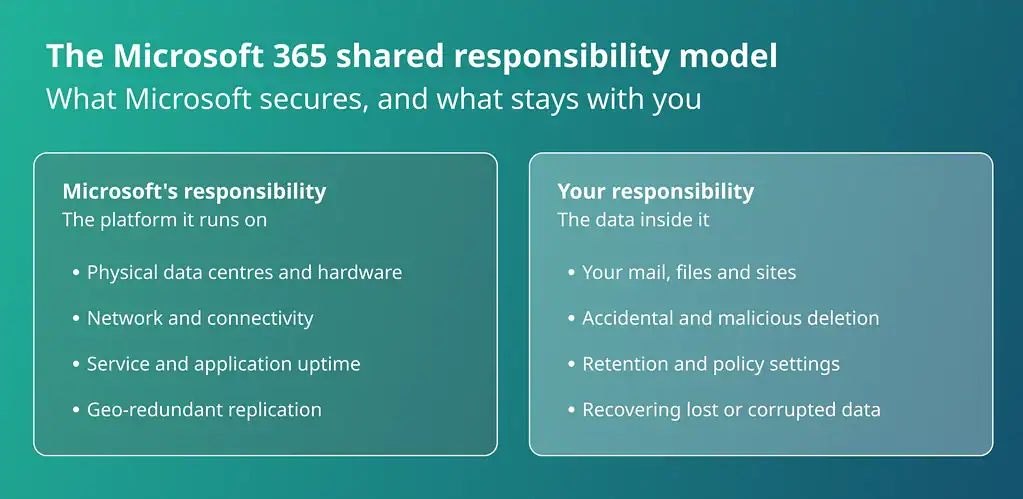
Geo-redundancy is not the safety net it looks like. It exists to shield Microsoft from hardware failure, and it replicates your mistakes as faithfully as your work. Delete a file in one location and every copy drops it within seconds. Uptime guarantees pay out when the service goes down. Not one of them brings back a mailbox you deleted yesterday.
Your Deleted Email Has a 14-Day Shelf Life
Your Microsoft 365 data comes with an expiry date, and email runs out first.
Exchange Online holds deleted items for 14 days by default, and 30 at the most, even when you extend the policy.
SharePoint and OneDrive give you longer, keeping files in the recycle bin for 93 days.
The number that decides your exposure is the shortest one: an email deleted in spring that a regulator asks for in autumn was purged weeks before anyone thought to preserve it.
Once a window closes, the data is gone, and no support ticket or budget brings it back.
Retention policies preserve records; they do not restore lost ones.
Six Ways You Lose Microsoft 365 Data Without Noticing
The ways you lose Microsoft 365 data are mundane, and that is why they get past you. None of the six below needs a sophisticated attacker, and most produce no alert at all. Read them the way you would read a risk register, from the everyday and likely down to the rare and catastrophic.
- Accidental deletion. Someone removes the wrong file or folder and says nothing, so the gap goes unnoticed until the recycle bin has long since emptied.
- The departing employee. Removing a licence and deleting the account purges the mailbox and OneDrive within about 30 days. The offboarding ticket reads as done while the data quietly runs down its clock.
- Misconfigured retention. A single well-meant policy change can delete records you were required to keep, with no error and no warning to flag it.
- Rogue third-party apps. An app granted broad permissions can overwrite or wipe data at scale, and the API traffic rarely looks like an attack until the damage is done.
- Ransomware and sync. Encrypted files sync straight into the cloud, and native version history holds only until the malware outruns the version limit. By the time the alert lands, your clean copies may already be gone.
- Tenant-level compromise. An attacker with admin access can reach anything inside the tenant, native backups included, and can switch off the very tools you would use to recover.
Microsoft Now Sells Its Own Backup. Is It Enough?
For most regulated businesses, rarely on its own. Microsoft’s native backup is a capable product, and it earns its place for the everyday slip. It takes point-in-time copies and restores them quickly, so a deleted folder or an overwritten file is back in minutes.
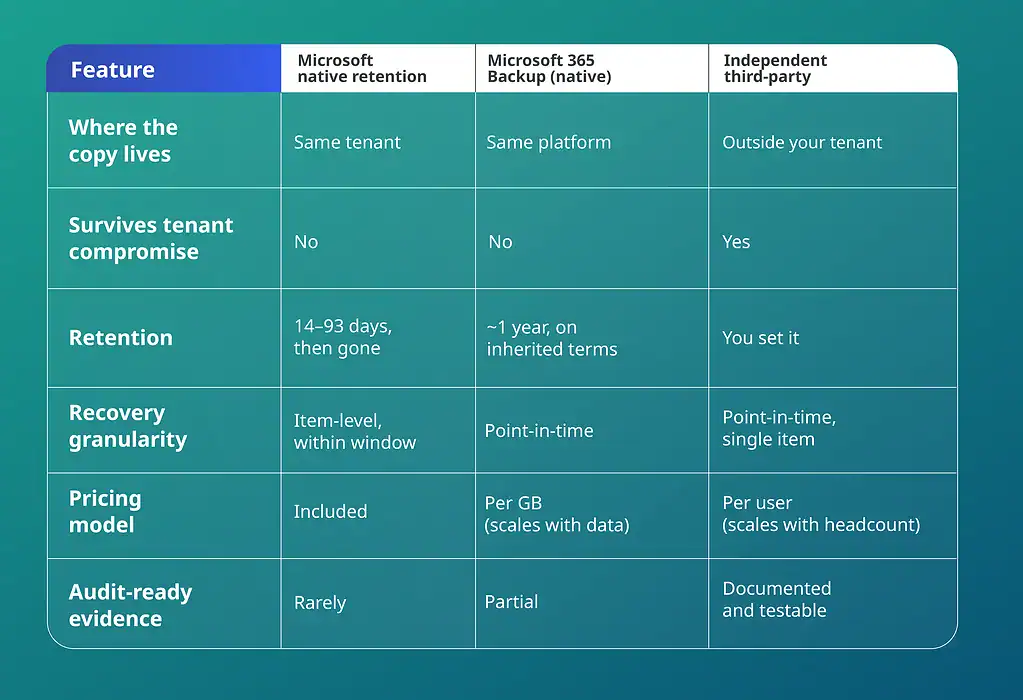
The weakness is where those copies live. Native backups sit inside Microsoft’s own infrastructure, on retention terms you inherit, which breaks the rule every serious backup strategy rests on. The 3-2-1 principle asks for three copies of your data, on two kinds of media, with one held off the platform entirely.
Keep your production data and its only backup inside the same tenant, under the same credentials, and you satisfy none of it. A compromised admin account, or ransomware that spreads across the tenant, can then take the native copies down with everything else.
Recovery only holds when your safety net sits beyond that reach, somewhere an attacker cannot follow. So run both. Native backup gives you speed for the daily restores; an off-platform copy gives you a fallback for the incident that takes the tenant with it.
A mature third-party market exists for exactly this gap, and the test that separates the options stays the same each time: where the copy lives, whether it survives a tenant-wide incident, and whether the bill tracks people or gigabytes.
Native vs Independent: How the Options Compare
A Slow Restore Is Now a Compliance Problem
Recovery speed stopped being a purely technical measure the moment regulators began scoring it. UK GDPR Article 32 requires you to be able to restore access to personal data in a timely manner after an incident. Failing to restore customer records has turned an operational outage into a regulatory one.
The reporting clock makes the exposure sharper.
Where personal data is involved, a notifiable breach must reach the ICO within 72 hours of becoming aware of it, and a drawn-out failure to restore that data can itself point to a lapse in the security you were obliged to maintain.
Auditors apply the same pressure from the other direction. ISO 27001:2022 names information backup as Annex A control 8.13, and a certification review wants evidence it can inspect: documented schedules, restores you have tested, and a provider whose own credentials hold up. Default settings in a productivity suite rarely produce that evidence.
Recovery is now something you must prove, on a deadline, to a regulator and an auditor at once. A recovery improvised from the platform’s built-in tools rarely survives that scrutiny. A proven, independent backup is what lets you answer the question before it is asked.
What a Microsoft 365 Outage Really Costs You
Downtime runs a meter, and Microsoft 365 sits at the centre of it. Email, files, Teams, and SharePoint stop together, so finance, sales, and support all lose access within the same hour.
Independent analysts at ITIC put a single hour of downtime above $300,000 for more than nine in ten mid-size and large enterprises, and four in ten place it beyond $1 million.
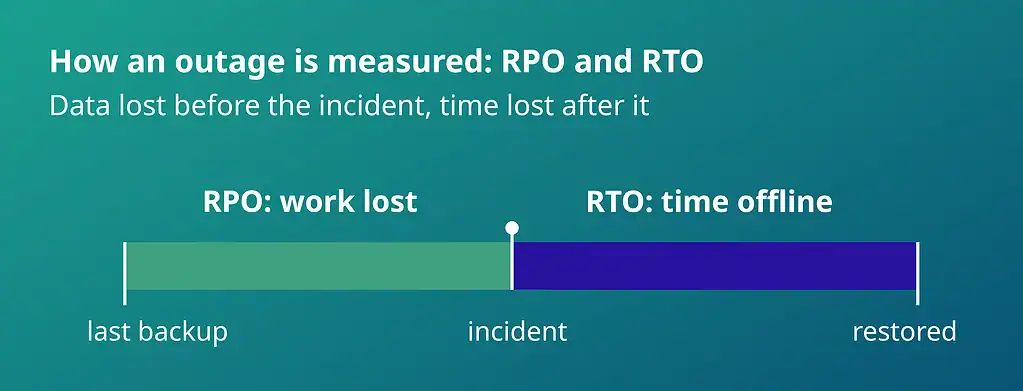
Whatever your own figure, two levers decide how large the bill runs: recovery time and recovery point. Set them deliberately, in advance, and the outage stays a manageable cost. Leave them to chance, and it does not.
Recovery time is the first: how long you stay offline. Every hour a mailbox or SharePoint site is down carries a price, in stalled teams, missed deadlines, and, in regulated work, contractual penalties. A restore measured in minutes keeps that price low and gives you a recovery time objective you can defend in a continuity review. A restore measured in days does the opposite.
The recovery point is the second: how much work you lose. Daily backup caps that loss at a day, and a snapshot taken before a risky migration shrinks it to almost nothing. Weigh either against rebuilding a week of deleted work from memory, and the number speaks for itself.
Running a backup yourself adds a quieter cost: the outage never shows you in storage, hardware, and the senior hours spent testing restores. A managed platform absorbs those costs and stays ready to restore on demand.
Recovery time and recovery point, mapped against the cost of an outage.
Eight Boxes Your Backup Platform Must Tick
Each risk above maps to something your backup platform has to do. Gathered into one checklist, they make eight tests you can hold any vendor against before you sign. A credible platform passes all eight, and the weaker ones tend to fail on the same few.
- Storage that sits outside the production tenant, so a compromised admin account or a tenant-wide attack cannot reach both your data and its only copy.
- Automated daily backups as the baseline, with on-demand snapshots you can take before a risky migration or change.
- Point-in-time recovery down to a single item, email, folder, or file, so you restore exactly what was lost and roll back to just before it happened.
- AES-256 encryption at rest, with OAuth and multi-factor authentication included by default.
- ISO 27001 certification, GDPR compliance, and a data-residency location you can name to an auditor.
- Pricing tied to user count rather than storage volume, so the bill stays flat as your data grows.
- A bring-your-own-storage option, so a larger estate can keep its backup in a cloud account it already controls.
- Setup and day-to-day administration measured in minutes, with no specialist skills or dedicated headcount to run it.
Recoverable by Deployflow: One Platform, Every Box Ticked
Each box on that checklist marks a way your Microsoft 365 data can disappear. Recoverable clears all eight from a single console.
Independence and Recovery
Held outside your tenant. Your backup lives in a private cloud, fully separate from Microsoft 365, so it survives the incident that takes the tenant itself down.
Daily and on-demand backups. Backups run automatically every day, with on-demand snapshots before any change you are unsure of, so a clean restore point is always ready.
Recovery down to a single item. Restore is point-in-time and granular, from one email or file up to a full site, rolled back to the moment before the loss.
Back online in minutes. Exchange, SharePoint, and OneDrive return in minutes, and Teams returns with them, since it rests on the same Exchange and SharePoint data.
Security and Compliance
Encryption and access control as standard. Everything is encrypted with AES-256, with OAuth and multi-factor authentication built in rather than sold as an upgrade.
Audit-ready by default. ISO 27001 certification, GDPR compliance, and EU data residency you can name to an auditor, backed by a 99.9% uptime commitment and round-the-clock support.
Pricing and Setup
Priced by people, not gigabytes. Storage is unlimited, and Recoverable charges a flat £3 per user per application each month, or £30 a year, so the bill stays flat however large your mailboxes and sites grow.
Live without a specialist. Setup and daily admin take minutes, with no specialist skills or dedicated hire. Start on the Business plan free for 30 days, and finish your first backup the same afternoon.
For a larger estate, the Enterprise plan keeps your backup in a cloud account you already control and adds volume pricing and advanced security. Google Workspace, Dropbox, Box, Azure, and AWS sit on the roadmap, so covering a new platform later will not mean a new tool to learn.
Close the Gap Before It Costs You
Every retention window in this guide is already counting down on data you may not miss for months. Acting now costs a fraction of recovering from a loss you caught too late.
Recoverable gives you an independent copy of your data, held outside your tenant and restorable in minutes, with a 30-day trial that needs no credit card.
Another incident will come. Put the copy in place now, and you meet it recovery-ready, with nothing left to prove under pressure.
Frequently Asked Questions About Microsoft 365 Backup
Is backing up Microsoft 365 the same as archiving it?
No. An archive moves older content into long-term storage to keep your live environment tidy, while a backup keeps an independent, recoverable copy you can roll back to after a loss.
An archived mailbox still sits inside your tenant, so a compromised account or a bad retention change reaches it as easily as your active data. Archiving answers is where you store what you rarely touch; backing up answers is how you get them back when they are gone. A mature estate usually needs both for different jobs.
What is the difference between Microsoft 365 backup and disaster recovery?
Backup protects the data; disaster recovery protects your ability to keep operating.
A backup gives you a clean copy of mailboxes, files, and sites to restore from. Disaster recovery is the wider plan that decides how fast people get back to work, which systems come first, and who does what while the clock runs. Backup is one component of that plan, and for a SaaS platform like Microsoft 365, it tends to be the component the plan forgets, on the assumption that the vendor has it covered.
How long should we keep Microsoft 365 backups?
Long enough to outlast the moment you discover the loss, which is often months after it happened.
A common baseline runs from one to seven years, set by whichever compliance regime governs your data: financial and legal records demand the longest retention; general business data, far less. Choose the period deliberately against your obligations rather than accepting a default, since the data you need is usually the data whose loss went unnoticed until an audit, a dispute, or a departing employee’s absence surfaced it.
How often should we test that our backups actually restore?
At least quarterly, and after any major change to your environment. A backup you have never restored is an assumption, and auditors increasingly want evidence of tested recovery rather than a policy on paper.
Run a real restore of a mailbox or a site collection, time it, and record the result. Testing after migrations, tenant changes, or a new provider matters most, because those are the moments a silent configuration gap turns a backup you trusted into one that fails when you reach for it.
How quickly can we recover from a large-scale incident such as ransomware?
Fast recovery depends less on raw backup speed and more on where the clean copy sits and how you restore at volume. Recovering one file is quick anywhere; recovering hundreds of mailboxes after ransomware is a different test, and the answer hinges on whether your backup escaped the same attack and whether you can restore in bulk without rebuilding account by account.
Ask any provider for realistic restore throughput at your estate’s size, not just a headline “restore in minutes”. A backup held outside the tenant, with bulk point-in-time restore, is what keeps a tenant-wide incident from becoming a prolonged outage.