

Microsoft keeps the service running, and recovering your data is left to you. Its own Services Agreement recommends you keep your own backup, and when a real incident hits, the speed of that recovery is your problem alone.
Your recovery plan probably covers the easy case well: one deleted file, back in minutes. The hard case, a full recovery after ransomware or mass corruption, runs on a completely different clock, and it is the one a board remembers.
The recovery time objective in your plan is only as honest as your grasp of that gap. Here is how the two kinds of recovery differ, what stalls a full restore, and how to set an RTO that holds.
Executive summary:
- Recovery comes in two forms: granular, for a single item, and full-tenant, for a wide loss.
- A granular restore takes minutes and barely touches your RTO. A full recovery is where recovery time is decided.
- Platform throttling, API limits, and sequential restores are what slow a large recovery down.
- Set tiered recovery targets by scope, and test the full restore at real volume before you promise a number.
- The fix is one platform that restores at both scales, quickly, from a copy held outside your tenant.
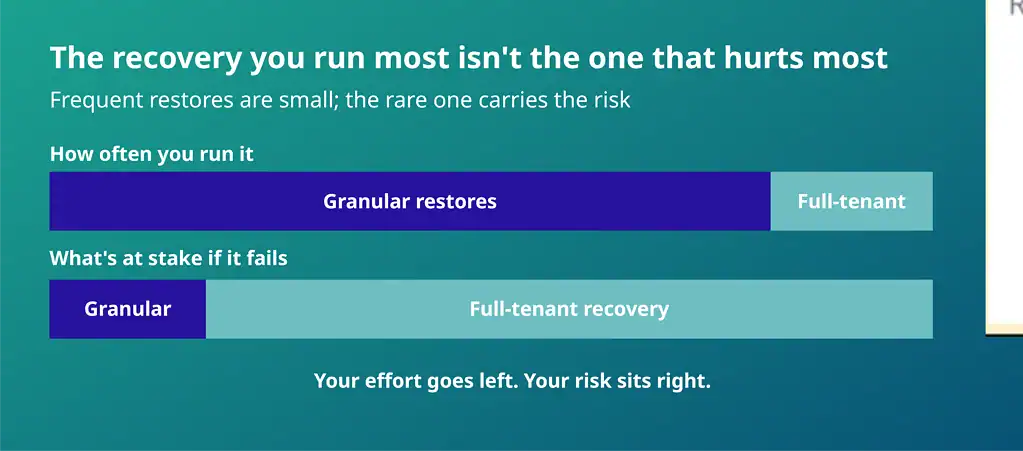
Know Your Two Recovery Modes Before You Need Them
Recovery in Microsoft 365 splits into two modes, and one variable separates them: scope.
Granular recovery, also called item-level recovery, works at the smallest scale. It restores one thing to a chosen point in time: a single email, a file, a folder, or a SharePoint site, and nothing around it. You reach for it constantly, and it finishes in minutes because the scope is tiny.
The point-in-time control is what makes it precise. You choose the moment to return to, so you recover the version from just before the loss rather than whatever the item looks like now.
Full-tenant recovery works at the opposite scale. It rebuilds a large slice of your estate, or all of it, after a loss that has spread across many users and services. You reach for it rarely, but when you do, hours or days are at stake.
Which Recovery Answers Which Disaster
The right recovery depends on the scale of the problem. A file someone deleted last week. A mailbox emptied when an employee left. A folder that lost its contents overnight.
Full-tenant recovery is for the events that hit at scale. Ransomware that encrypts across the estate, a mass corruption, a rogue app that wiped data through its permissions, or a migration that failed halfway.
These are the events that the NCSC’s ransomware-resistant backups guidance is intended to address. The trigger is rare, the reach is wide, and this is the recovery your continuity plan is built around.
Between those poles sits the case that catches people out. A single department, a set of compromised accounts, or one heavily used site. Larger than a file and smaller than the estate, yet still enough to stall a business unit for a day.
Scope runs on a spectrum, and your plan needs a credible answer at every point on it.
Why Recovery Scope Decides Your RTO
Recovery time becomes outage time the moment a restore stops people from working. One in five major IT outages now costs more than $1 million, and more than half top $100,000, according to the Uptime Institute’s 2026 outage analysis.
Three things decide how long a large recovery runs: the volume of data to move, the number of items to process, and the way your platform handles them.
A restore of a few thousand files behaves nothing like a restore of a few million, so your RTO has to be built for the larger case.
A single advertised restore speed can mislead you here. When a vendor promises recovery in minutes, that figure almost always describes the granular case, one file or one mailbox. It rarely reflects a full-tenant rebuild, and the two can differ by days.
Read any speed claim as a question. At what scope, and tested against how much data?
The Hidden Delays That Stall a Full Recovery
A full recovery runs into limits you rarely see until you need them. Microsoft caps how fast data flows back, so a large restore waits on the platform, and many tools make it worse by restoring one queue at a time.
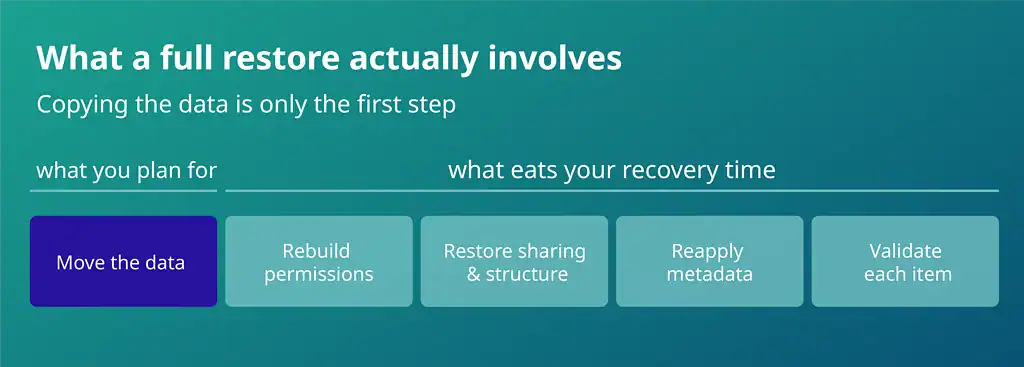
The real cost is less visible. Rebuilding the shape of your data, its permissions, sharing, and structure takes far longer than copying it. Return the data without that shape, and you have a second recovery to run by hand.
A platform built for scale restores in parallel and rebuilds the shape with the content, ensuring a full recovery within its window.
Set an RTO Your Auditor Will Accept
One recovery time objective for everything is a promise you will break. A single-item restore and a full estate rebuild are different jobs, so tier your target by scope and let each tier carry only the commitment it can keep.
Then prove it. Test a restore at realistic volume rather than a token file, and the number in your plan will match what the platform delivers under pressure.
That is also what an auditor wants: UK GDPR Article 32 requires you to restore personal data in a timely manner, and ISO 27001 requires recovery that you have tested. A measured, tiered number is a compliance asset as much as an operational one.
Scope is only half the tiering. Decide the order, too. Rank which mailboxes, sites, and teams return in the first hour, which can wait until the end of day one, and which can sit until the backlog clears.
A finance team mid-close and an archive site do not carry the same urgency, and agreeing that ranking in advance is far easier than negotiating it during an incident.
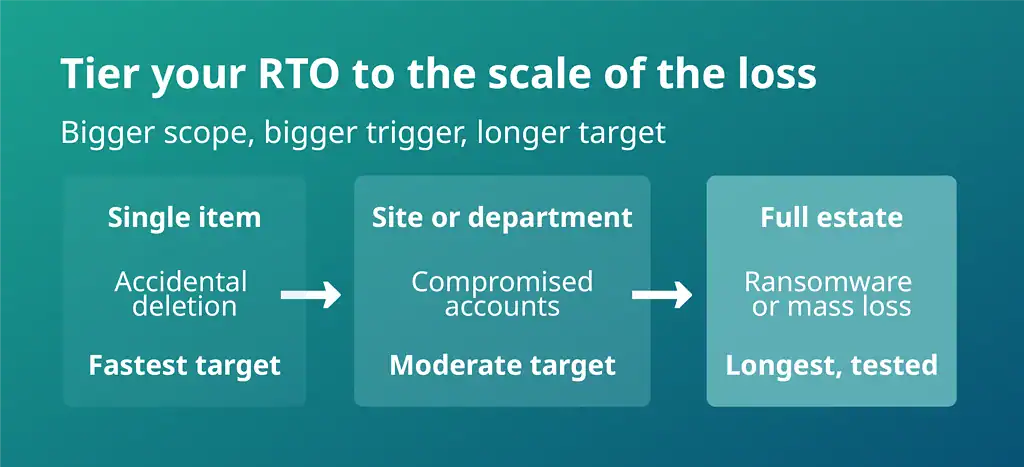
How to Calculate a Full-Restore RTO You Can Defend
Count items. Restore speed is governed by API calls, so 200,000 small files take far longer to return than the same volume of data held in a few large files. Start from the item count of your largest workload.
Then run a sample. Restore a representative slice, five per cent of a busy SharePoint site or a set of large mailboxes, and record two figures: items returned per hour, and how much of that time went to content versus permissions and structure.
Scale the sample to full scope, add the permissions rebuild, then apply a contention allowance. A real incident restores several workloads at once against the same throttling ceiling, so the parallel job never runs at the speed of the isolated test.
Record the assumptions next to the number. When your data grows, or your tenant changes shape, you re-run the test rather than re-argue the target.
What to Demand From a Backup Platform
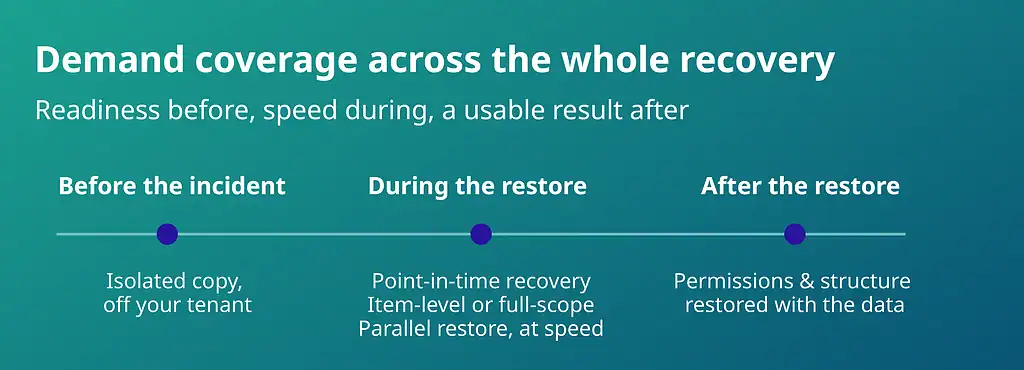
A backup platform has to answer for the whole recovery, from the readiness that exists before an incident to a usable result after it. A copy a compromised global admin can reach is not a recovery path, and a platform that queues workloads sequentially turns a one-day recovery into a one-week recovery.
Hold any vendor against the demands below, and treat every missing one as a risk you will inherit.
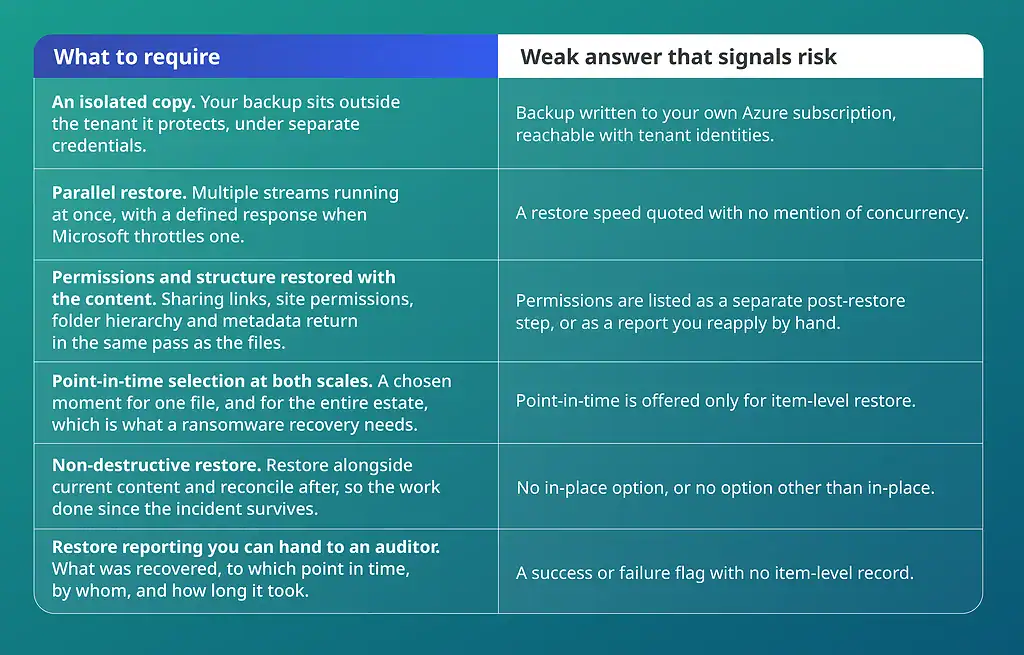
Ask for each of these in writing, and ask for the timings against a tenant the size of yours rather than a reference figure.
Recoverable by Deployflow: Recovery That Holds at Any Scale
Few platforms hold their speed from one file to a full estate. Recoverable, built by Deployflow, is designed to do so.
Point-in-time and granular recovery bring back exactly what you lost, down to a single item, email, folder or file.
Teams is covered through the SharePoint and Exchange data.
The same backup drives a full-scope rebuild, so everyday restores and major incidents run from one place. Your copy is in an EU-based private cloud, outside your Microsoft tenant, so a tenant-level attack leaves your recovery path untouched.
The result is a recovery time that holds whether you are restoring one file or the entire estate.
Test Your Recovery Time Before a Disaster Does
Your recovery time is only real once you have tested it at the scale a disaster would demand. Few businesses are that ready: only a quarter of UK businesses hold a formal incident response plan, government figures show. The time to close that gap is now, while the plan is still yours to shape.
Start with where you stand. A Deployflow assessment maps your recovery scope and the realistic RTO behind it, before you commit to anything. Recoverable then gives you a platform that restores at both scales from a single isolated copy, free to trial for 30 days with no credit card.
The next incident will set the scale. Make sure your recovery time is a number you have already met.
Frequently Asked Questions About Granular Restore vs Full-Tenant Recovery
What is the difference between RTO and RPO?
RTO is how quickly you need to be back up; RPO is how much data you can afford to lose.
RTO, the recovery time objective, measures downtime, the gap between an incident and a working service. RPO, the recovery point objective, measures data loss, counted back to your last clean backup.
A daily backup, for example, caps your RPO at roughly a day of work, since anything saved after that copy is lost with the original. The two pull in opposite directions: a tighter recovery time demands faster restores, a tighter recovery point demands more frequent backups. Weigh each against what downtime and lost work cost you.
How long does the first Microsoft 365 backup take?
The first backup can take anywhere from a few hours to a few days.
The initial copy has to move every mailbox, file, and site you hold, and Microsoft throttles how fast data leaves through its APIs, so the first pass is bound by the platform rather than your connection. After that run, backups turn incremental and capture only what changed since the last one, which is why later jobs finish in a fraction of the time.
Data volume and user count set the length of the first pass, so a large tenant with years of history sits at the top of that range.
What is the difference between backup and archiving?
A backup is a separate copy you restore from; an archive is long-term storage you keep for reference or compliance.
Backups exist to restore data quickly after deletion, corruption, or an attack, and they support point-in-time recovery, so you can return to a version from just before the loss. Archiving holds data for the long run and is built for retention and search, so its strength is finding an old record rather than rushing a restore. An archive is not a backup: it will not save you when live data is deleted or encrypted. Treat the two as separate needs and run both.
How do you recover a deleted Microsoft 365 user’s data?
If the account was deleted recently, restore it from the Microsoft 365 admin centre within about 30 days, which brings the mailbox and OneDrive back.
Within that window, the account sits in a soft-deleted state, so a few clicks return the user, the mailbox, and OneDrive together. After roughly 30 days, Microsoft purges the account and everything tied to it, and native recovery is gone.
A third-party backup removes that deadline, holding an independent copy outside the platform. With one in place, you can recover a former employee’s mail, files, and sites long after the account is gone, which matters when a legal or compliance request arrives late.
How often should you back up Microsoft 365?
Back up at least once a day, and run an extra backup by hand before any risky change.
A daily schedule keeps your worst-case data loss to a single day, and an on-demand snapshot before a migration or bulk edit shrinks that exposure further. Microsoft 365 offers retention policies and a recycle bin, but no scheduled point-in-time backup of its own, so a set schedule is a strong reason to add a third-party tool.
Match the frequency to how fast your data changes: a busy tenant earns more than one run a day. How often you back up is exactly what sets your RPO.